
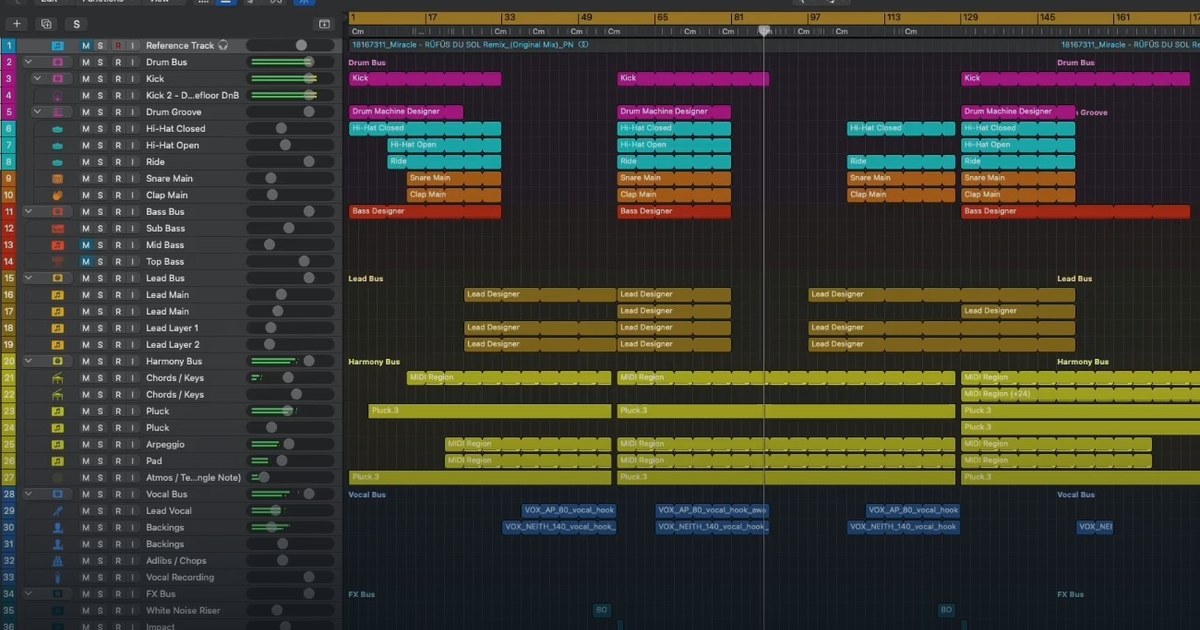
How to Arrange a Track in Logic Pro: From 8-Bar Loop to Full Song
Arrangement
Your loop sounds great. Here's how to turn it into a track people actually listen to from start to finish.
Almost every producer knows this moment: you've built an 8-bar loop that sounds amazing, you play it fifty times, and then you get stuck. The loop is fine. What's missing is a plan for how the track should move from the first bar to the last. That plan is your arrangement, and once you have a simple system for it, finishing tracks gets a lot easier.
In this guide I'll show you the arrangement workflow I use in Logic Pro, the same one I use in the video below where I build a full melodic house track from scratch with my template.
Step 1: Start with a reference track
Drag a finished track you love into your project on its own track at the top. You're not copying it. You're using it as a map: how long is the intro, when does the first breakdown hit, how long is the drop? Look at the waveform and you'll see the structure right away.
If you're on a newer Logic Pro version with an Apple silicon Mac, you can also drag the reference onto the Chord Track (press G for Global Tracks) and let Logic detect its chords. Great for learning, as long as you write your own ideas on top.
💡 Pro tip: Turn the reference down so it roughly matches the loudness of your unmastered track. A mastered reference is much louder and will make your own mix sound worse than it is.
Step 2: Build one full loop with everything in it
Before you arrange, make one 8- or 16-bar section that contains every element of the track: drums, bass, chords, leads, vocals, FX. This is your "full" section, usually the drop. Don't worry about the rest of the song yet.
Step 3: Map your sections
Electronic music works in blocks of 8, 16 and 32 bars. A structure like this is a solid starting point for house and melodic techno:
- Intro (16–32 bars): Drums and a few elements. DJs need this to mix in.
- Build (16 bars): Add layers, open filters, raise the energy.
- Drop / main section (32 bars): Everything playing.
- Breakdown (16–32 bars): Drums out, chords, pads and vocals carry the emotion.
- Build (8–16 bars): Risers, snare rolls, tension.
- Drop 2 (32 bars): The main section again, ideally with something new.
- Outro (16–32 bars): Strip back to drums so the next track can be mixed in.
Add these sections with Logic's Arrangement Track (in the Global Tracks). You can name each section and move or copy whole sections later with everything in them.
It's a starting point, not a rule. Your reference track will tell you where your genre likes to bend it.
Free download
The Arrangement Cheat Sheet
The full section map, bar counts and transition checklist on one printable page. Keep it open while you arrange and you'll never stare at a loop again.
Get the free cheat sheet →Step 4: Copy the loop across, then subtract
Here's the trick that makes arranging fast: copy your full loop across the whole length of the track, then remove what each section doesn't need. Mute or delete the bass in the intro, take the drums out of the breakdown, strip the outro back to kick and hats.
Taking things away is much easier than adding them, because you're making decisions instead of creating from nothing.
Step 5: Connect sections with transitions
Without transitions, your sections sound like separate loops glued together. A few simple elements fix that:
- White noise riser in the bars before a breakdown or drop to build tension.
- Impact or boom right on the first beat of the new section.
- Crash on the first beat of the drop.
- Downlifter after a big moment to bring the energy back down.
- Remove one element for the last bar before the drop (often the kick). The short gap makes the drop hit much harder.
Step 6: Automate the energy
Automation is what makes an arrangement feel alive. Press A to show automation and try these three moves:
- Filter sweeps: Automate a low-pass filter on leads or vocals so they slowly open up during a build.
- Send automation: Start a new lead completely dry and automate its reverb and delay sends up. It sounds like it comes out of nowhere.
- Volume and layer changes: Bring a second, faster pattern in for the second drop so it feels bigger than the first.
💡 Pro tip: Every 8 or 16 bars, something should change, even if it's small: a new percussion layer, a filter opening, a vocal chop. Listeners won't notice each change, but they'll notice when nothing changes.
Step 7: Listen from start to finish
Close your eyes and play the whole track without stopping. Where does your attention drift? That's where you need a change. Where does it feel rushed? Give that section more bars. Then save, take a break, and listen again with fresh ears.
FAQ
How long should an electronic track be?
Club-focused house and techno tracks often run 5 to 7 minutes because DJs need long intros and outros. Radio or streaming edits are usually 2.5 to 4 minutes. Decide early which version you're making.
Do I have to use 8-bar blocks?
No, but they're the safest choice for dance music. Listeners and DJs expect changes on 8-, 16- and 32-bar boundaries, so breaking the pattern should be a deliberate choice, not an accident.
Want a head start? My free Logic Pro template comes with buses, sends and routing already set up, so you can start arranging instead of setting up tracks.
What's next
From 8-bar loop to finished track.
14-Day Music Producer is my upcoming course that walks you through this whole process step by step, until your first release-ready track is done. Join the free waitlist for launch updates and the best price.
Join the waitlist →