
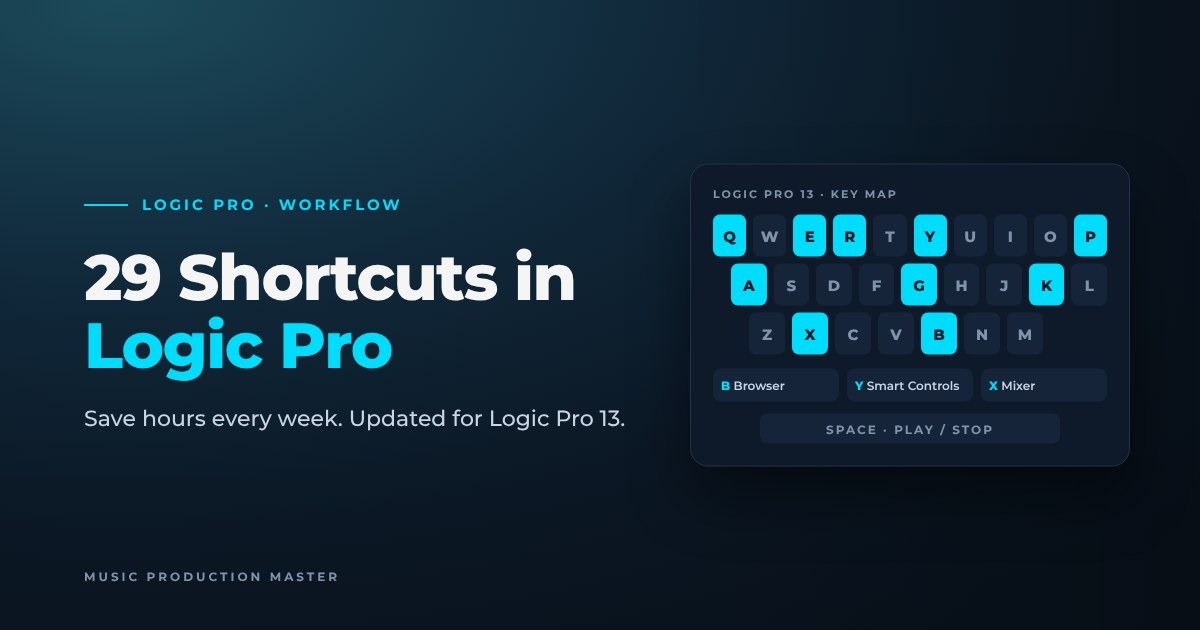
Logic Pro Keyboard Shortcuts: 29 That Save You Hours Every Week
Workflow & Speed
The keys I press in every session, updated for Logic Pro 13. Learn them once and stop hunting through menus.
Every click you replace with a key saves a second or two. That sounds small until you count how often you press play, open the Piano Roll or duplicate a region in a single session. Over a week it adds up to hours, and more importantly, it keeps you in the creative flow instead of searching through menus.
Below are the 29 shortcuts I use most, sorted by what you're doing. They're checked against Logic Pro 13. A few keys changed compared to older versions, and I point those out where it matters.
Prefer to watch? Here's my video walkthrough (recorded in Logic Pro 12, so B and Y work differently there):
Transport: 6 keys you'll press all day
- Space: Play / stop.
- Return: Jump back to the beginning of the project.
- R: Record.
- Shift + R: Capture Recording. Logic keeps listening even when you're not recording, so if you just played something great, press this and it's on the track.
- C: Cycle mode on / off.
- K: Metronome on / off.
💡 Pro tip: Shift + R is the one most producers don't know. Jam over your loop with the transport running and stop worrying about hitting record at the right moment.
Navigation: 4 keys to move without the mouse
- . (period): Forward one bar.
- , (comma): Back one bar.
- Shift + . Forward eight bars.
- Shift + , Back eight bars.
Eight bars is the length of most sections in electronic music, so Shift + period and Shift + comma let you jump from section to section while you arrange.
Windows and views: 10 one-letter keys
In Logic, almost every letter opens a window. These are the ones worth knowing by heart:
- E: Editor (shows the right editor for the selected region).
- P: Piano Roll.
- X: Mixer.
- B: Browser. New in Logic Pro 13: your sounds, patches and loops in one place.
- Y: Smart Controls. The quick macro knobs for the selected instrument or channel.
- F: File Browser.
- G: Global Tracks (Arrangement markers, Chord Track, Tempo and more).
- I: Inspector.
- A: Show / hide automation.
- V: Show / hide your open plug-in windows.
💡 Coming from Logic Pro 12 or older? B used to open Smart Controls and Y opened the Library. In Logic Pro 13, B is the Browser and Y is Smart Controls. If your muscle memory keeps opening the wrong window, that's why.
Free download
The Essential Logic Pro Shortcut Guide
The basic shortcuts plus a color-coded keyboard map of every one-letter key, updated for Logic Pro 13. Print it and keep it next to your keyboard.
Get the free shortcut guide →Editing and MIDI: 6 shortcuts that speed up every idea
- Cmd + T: Split the selected region at the playhead.
- Cmd + R: Repeat the selected region. Perfect for turning a 4-bar idea into 16 bars.
- J: Join the selected regions on each track into one.
- Option + drag: Duplicate a region, MIDI note, track or automation point.
- Q: Quantize the selected notes or regions.
- Option + Up / Down: Transpose the selected notes by one semitone. Add Shift to move a full octave.
Mixing and export: 3 keys to finish faster
- Option + Cmd + C / V: Copy and paste complete channel strip settings. Build your vocal or drum chain once, then reuse it.
- Ctrl + B: Bounce the selected region in place. Great for freezing a sound you like and saving CPU.
- Cmd + B: Bounce the project (or the cycle area) to an audio file.
Make Logic yours: build your own shortcuts
The fastest producers don't just learn shortcuts, they build their own. Press Option + K to open the Key Commands window, search for any function by name and assign a free key. Start with the one action you repeat most that still takes two or more clicks.
💡 How to actually learn them: Pick three shortcuts per week and force yourself to use only the keyboard for those actions. After a month, the most important ones are in your fingers and you'll never think about them again.
FAQ
Do Logic Pro shortcuts work on a German keyboard?
Yes. The letter keys work the same. Y and Z keep their position on the keyboard map, so check the key label rather than the printed letter if something feels off. A few symbol shortcuts (like Legato) sit on different keys, which the shortcut guide lists for both layouts.
Why does B open the Browser instead of Smart Controls?
Logic Pro 13 changed it. B now opens the new Browser and Y opens Smart Controls. Tutorials made with Logic Pro 12 or older still show the old keys.
Can I reset my key commands?
Yes. In the Key Commands window (Option + K) you can switch back to the default preset at any time.
What's next
From 8-bar loop to finished track.
14-Day Music Producer is my upcoming course that takes you from a loop to a finished, release-ready track in Logic Pro with one repeatable workflow. It includes the full Logic Pro Keyboard Shortcut Guide with 120+ shortcuts as a bonus. Join the free waitlist for launch updates and the best price.
Join the waitlist →